Free to download and to write. For iPhone with iOS 26 or later.
Write it. Sing it. Shape it.
One page holds the whole song. There’s nothing to set up and no account to make.
Write
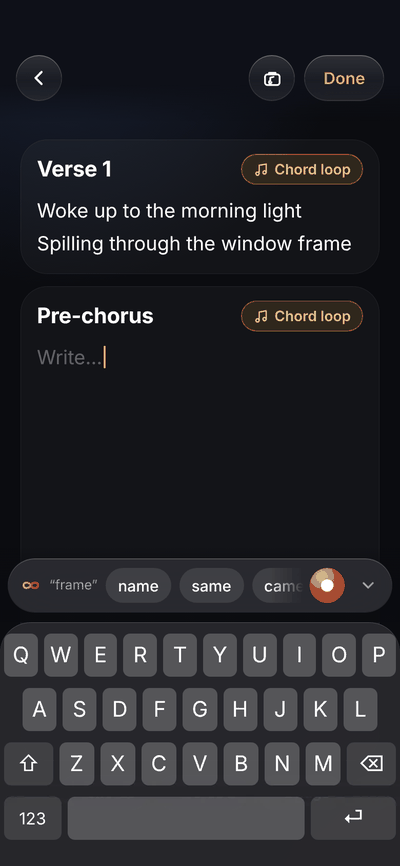
Type your lyrics like a note. Tap a word to put a chord on it, and hold a chord to slide it to another word.
Sing
Tap the red button and sing. The take stays with the song, and Live Lyrics can write down the words you sang.
Shape
Add a guitar, a harmony, a keys part. Then drag one glowing puck to make each track warmer, brighter, dreamier or more up front.
Made the way songwriters already work
Genesis starts where most songs start, in a note and a voice memo, and keeps going when the song does.
Writes like Notes
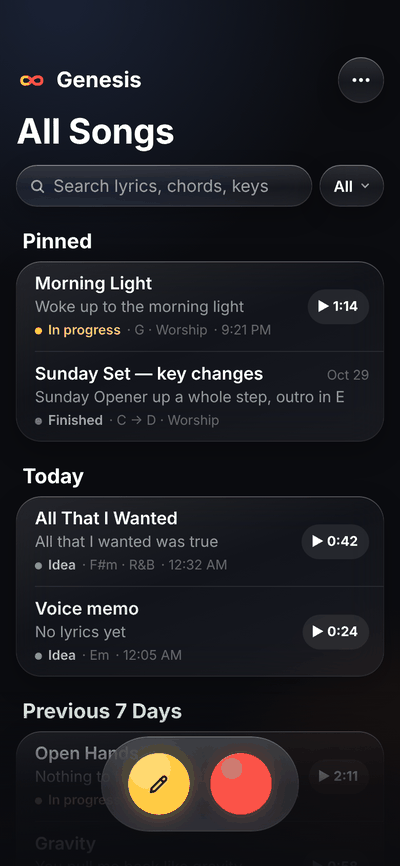
Your songs open fast, in a list that feels like the Notes app. Every song is one page, with its sections, chords and recordings together.
Sections that moveType “Chorus” on its own line and it becomes a section. Hold its name to move it somewhere else.
Rhymes as you writeThe Rhyme Bar suggests rhymes for your last word above the keyboard. The Rhyme Finder goes deeper, from more than 30,000 words.
Bring what you haveImport a voice memo, a note or lyrics you’ve already written, and keep going.
Records like Voice Memos, with a studio inside
One tap on the red button and you’re recording, even straight from the song list. It’s as quick as Voice Memos, but every take stays with its song, stacks into tracks and can grow into a real demo.
A song with one guitar track. The record button starts a new recording while the guitar plays back, and a second track appears in its own color when you stop.
TracksRecord a guitar, then sing over it. Each track gets its own color, and you can mute or solo any of them.
Studio basics, built inA metronome and tuner, and hear yourself as you sing through wired headphones or an audio interface. Keep writing while it records.
VersionsRewrite or re-record the whole song as a new version. The earlier ones stay one tap away.
Punch-inWith Pro: fix one line without redoing the whole take. The old take is never lost.
Chords right over the words
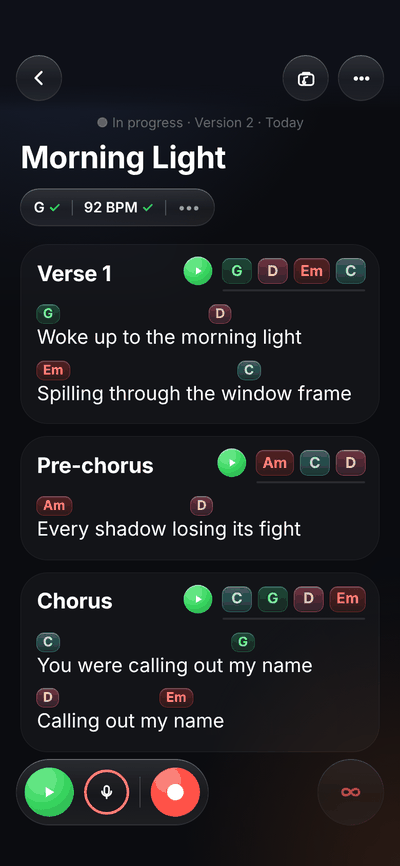
A chord sits on the syllable you sing it on. Its color tells you what it does in the key: green feels like home, red aches, pink leans back toward home.
Chord ChipsTap a word to add a chord from your key. Hold a chip to drag it to another word.
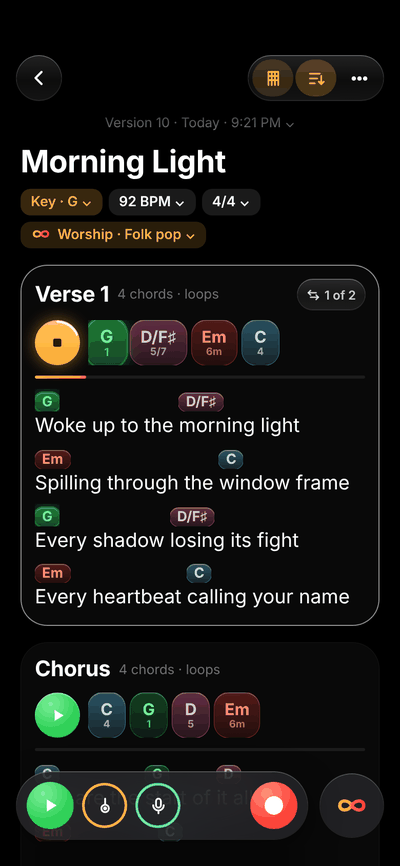
Chord LoopsPlay a section’s chords round and round on a warm Rhodes, and write the melody over them.
Smart ChordsWith Pro: ideas for the next chord, more than 300 progressions to try, and Explore, which lays out the chords that fit your key by feeling.
Let Genesis listen
After a take, Genesis can write down what you sang, find the key and tempo, and pull the parts apart. It all happens on your iPhone.
Live LyricsSing a take and the words go into your song, ready to edit. The first time, it downloads a speech model of about 250 MB on Wi-Fi.
Key Finder and Tempo FinderThey fill in the key and tempo, so the metronome and chord loops follow you. They need iOS 27; you can always type them yourself.
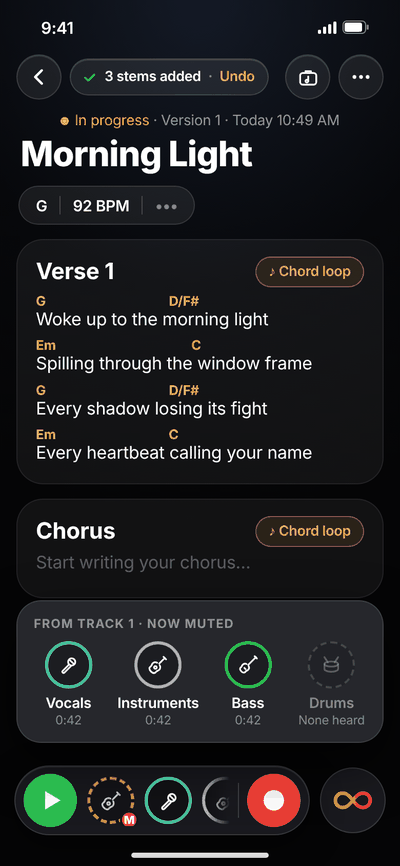
StemsSplit a recording into vocals, instruments, bass and drums, each as its own track.
ProThese are part of Genesis Pro.
Shape the sound
When the idea’s ready to sound like a song, every track has its own sound, from one simple puck to a full rack.
Tone MapDrag one glowing puck toward Warm, Bright, Dreamy or Up front. Level Match keeps the volume steady while you try things.
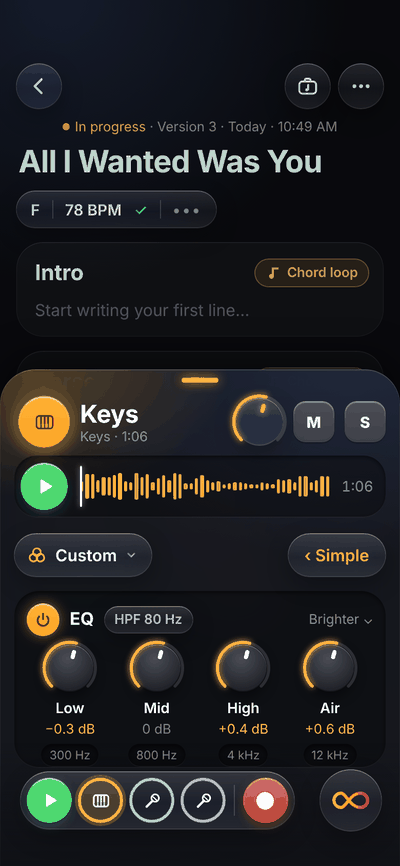
Studio RacksEQ, Compressor, Reverb and Delay with real knobs, for when you want to get specific.
Clean UpTurns down background noise, hum, harsh “s” sounds and room echo on a phone recording.
ProThese are part of Genesis Pro.
Take it anywhere
Send a rough mix to the band, print a chord chart for Sunday, or open every track in your studio.
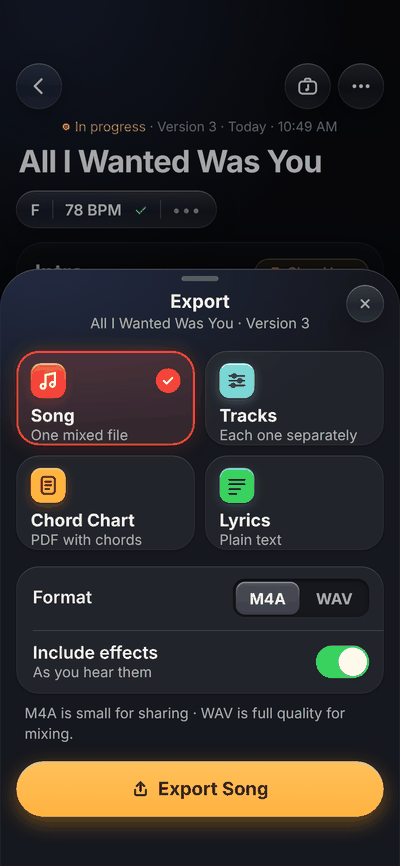
Song and chord chartA mixed song file small enough to text, and a PDF chart with chords over the right words. Lyrics too.
Studio exportWith Pro: a full-quality WAV of the song and of every track, stems included. They all start at the top of the song, so they line up in Logic Pro, Ableton Live, Pro Tools or any other DAW.
Free to write. Pro to finish.
Writing, chords and recording are free. Genesis Pro is for taking a song all the way.
Recently DeletedSongs wait 30 days, recordings and all
Chords
Chord ChipsTap a word to add a chord, hold one to move it
Chord Loops
Chord SoundsRhodes, Grand Piano, Synth and Bass
Rhodes
All four, layered
Smart ChordsNext-chord ideas, 300+ progressions and Explore
Record
Tracks per song
3
Unlimited
Versions per song
3
Unlimited
Hear yourself while you recordWith wired headphones or an interface
Keep writing while you record
Metronome and tuner
Punch-inRedo one line without redoing the take
Listen
Live LyricsWrites down the words you sang
Key Finder and Tempo FinderNeeds iOS 27
StemsSplits a recording into vocals, instruments, bass and drums
Sound
Tone Map
Studio RacksEQ, Compressor, Reverb and Delay
Clean UpLess noise, hum, harsh “s” sounds and room echo
Export
Song as audio (M4A)
Chord chart (PDF) and lyrics
Studio exportFull-quality WAV of the song and of every track
Made for you
Light and dark, Lefty or Righty, app icons, Tips
Yearly, $49.99. Starts with a 7-day free trial, then about $4.17 a month. It’s the launch price: start at $49.99 and you keep it for as long as you stay subscribed.
Monthly, $7.99. No trial. Cancel any time.
Nothing you make is ever locked. If Pro ends, every recording still plays and exports, and the sound you shaped is still heard. You just can’t add past the free limits or change Pro settings until you subscribe again.
Genesis Pro is an auto-renewable subscription, bought through the App Store with your Apple Account. Payment is charged to your Apple Account when you confirm the purchase or, if you start the free trial, when the 7-day trial ends. The free trial is for new subscribers to the yearly plan.
Your subscription renews automatically at the same price and for the same length unless you turn off auto-renew at least 24 hours before the end of the current period. Your account is charged for the renewal within the 24 hours before the period ends. Cancel during the free trial and you won’t be charged.
Manage or cancel any time in Settings › Apple Account › Subscriptions on your iPhone. Refunds are handled by Apple at reportaproblem.apple.com. Prices are in US dollars and may vary by country or region, and may include tax where required. See the Terms of Use and Privacy Policy.
App Privacy
Data Not Collected
The developer does not collect any data from this app.
Your songs stay yours
Genesis doesn’t collect anything about you. Your lyrics and recordings live on your iPhone, and they’re yours.
No account
Open it and start writing. There’s nothing to sign up for.
Heard on your iPhone
Live Lyrics, Key Finder, Tempo Finder and Stems run on the device. Your voice isn’t sent anywhere.
No ads, no tracking
There’s no analytics or advertising code in the app.
You choose what to share
A song only leaves your iPhone when you export it or send it.
Yes. Writing, chords, rhymes, recording up to 3 tracks and 3 versions per song, and exporting the song, a chord chart and lyrics are all free. Genesis Pro adds the rest of the list above, with a 7-day free trial on the yearly plan.
Do I need an account?
No. There’s no sign-up and no login. Subscriptions go through your Apple Account, like any App Store purchase.
Does it work without internet?
Yes. Writing, recording, chords, stems and sound all work in airplane mode. Two things download once: the Live Lyrics speech model (about 250 MB) the first time you use it, and the Grand Piano sound the first time you pick it.
Can I use it on iPad or Mac?
Genesis 1.0 is for iPhone. Syncing your songs between devices is coming next.
Will my tracks open in my DAW?
Yes, with Pro. Studio export gives you every track as a WAV file, stems included, and they all start at the top of the song, so they line up when you drop them into Logic Pro, Ableton Live, Pro Tools or any other DAW. Full session files are coming next.
What happens to my songs if I get a new iPhone?
Your songs are part of your iPhone’s iCloud Backup, so they come back when you set up a new iPhone from that backup. More on moving to a new iPhone
Write the first song with us
Genesis is in beta on TestFlight. Join, write something, and tell me what you think. I read every message.